
Build front-end only applications at the speed of thought.
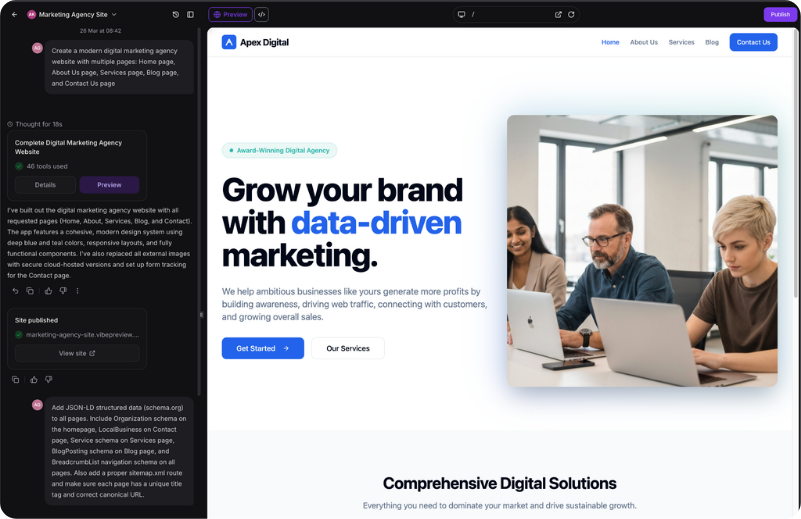
Welcome to the future of software development. AI Studio is our revolutionary "vibe coding" platform that turns your plain English descriptions into production-ready, front-end only applications instantly.
Prompt-to-Frontend: Just describe what you want to build, and our AI generates stunning, responsive React applications in seconds.
Native Integrations: The generated websites integrate directly and seamlessly into your CRM forms, calendars, and automation workflows.
SEO Optimized: Clean, maintainable code built on modern frameworks that automatically implements SEO best practices to help you rank.
The Engine Under The Hood
Here is the breakdown of every AI engine powering Automated Sales Machine.
1. AI Studio (Frontend Builder)
Like Lovable.dev but natively integrated. Build front-end websites and applications at the speed of thought.
Prompt-to-Website: Describe the website or app you want, and AI Studio generates production-ready code instantly.
Seamless ASM Integration: It automatically pulls in the right calendars, creates forms, and wires up your CRM without any manual configuration.
2. Agent Studio (Custom AI Workforce)
This is the central hub where you build, train, and manage highly specialized AI agents to act as your digital employees.
Persona Creation: You can build agents with specific jobs, giving them distinct instructions, tones, and boundaries (e.g., "You are a technical support rep for a plumbing company").
Knowledge Base Training: You train agents by uploading your PDFs, pasting FAQs, or feeding them your website URLs so they only answer based on your actual business data.
API & External Actions: Agents are not trapped in the chat box. They can be configured to trigger external actions using APIs—like updating a Google Sheet, checking an external inventory database, or sending a Slack message—right from a conversation.
3. Conversation AI (Omnichannel Chat Agent)
This AI handles text-based communication across SMS, Facebook Messenger, Instagram DMs, WhatsApp, Google Business Profile, and your Webchat widget.
Intent Recognition: It reads the context of incoming messages to determine what the customer wants (e.g., support, pricing, or booking) and routes the conversation accordingly.
Autopilot Booking: It can converse naturally with leads, check your CRM calendar for availability, offer time slots, and securely book appointments without human intervention.
Vision / Image Recognition: If a lead texts a photo (like a picture of a broken pipe or a screenshot of an error), the AI can analyze the image and respond intelligently based on what it sees.
4. Voice AI (The 24/7 Phone Agent)
This tool acts as a tireless, round-the-clock receptionist capable of having natural, spoken conversations.
Inbound & Outbound Calling: It can answer all incoming calls instantly, handle unlimited simultaneous callers, qualify leads, and even execute outbound follow-up calls when someone submits a form.
Intent-Based Routing: The Voice AI can figure out why someone is calling and transfer them to the correct human department if the issue requires escalation.
Website Voice Chat: Website visitors can click a microphone icon on your site and speak directly to your Voice AI agent through their browser without ever having to dial a phone number.
5. Funnel & Website AI
This is a prompt-to-page generator that eliminates the need to build pages from a blank canvas.
Rapid Generation: You type what you need (e.g., "Build a landing page for a roofing company offering free inspections, use a blue color scheme"), and the AI instantly generates the layout, structure, and copy.
Automated SEO Schema: As it builds the site, the AI automatically generates "Schema Markup" metadata. This translates your site data perfectly for search engines, helping you rank higher in Google rich results and AI search engines.
6. Workflow AI (The Automation Builder)
This engine takes the headache out of building complex backend automations.
Prompt-to-Workflow: Instead of manually dragging and dropping logic steps, you can type a prompt like, "Send a welcome email, wait two days, and text them if they didn't reply." The AI builds the entire workflow architecture for you.
In-Workflow AI Actions: You can add specific AI steps inside your automations. For example, you can tell the workflow to use AI to summarize a long customer email, detect the intent of a text message, or translate a response into Spanish before sending the next message.
7. Reviews AI (Reputation Management)
This handles the tedious but vital task of responding to your Google and Facebook reviews to boost local SEO.
Suggestive Mode: The AI reads a new review and drafts a personalized, context-aware reply for you to review and approve with one click.
Auto-Pilot Mode: The AI instantly and autonomously replies to every review 24/7. It matches the tone of the review—thanking 5-star reviewers enthusiastically, and professionally addressing 1-star complaints while offering a path to resolution.
8. Content AI (The Copywriter)
This is your built-in writing assistant, deeply integrated into the platform where you actually need it.
Multi-Channel Copy: It generates high-converting text for social media posts, email newsletters, blog articles, and website headlines.
Tone Adjustment: You can tell it to rewrite content to sound more professional, casual, urgent, or witty, depending on your brand voice.
9. Image AI (The Designer)
Integrated directly into your ASM media library, this eliminates the need for stock photo subscriptions.
Prompt-to-Image: You can generate highly specific hero images, banners, or graphics simply by describing what you want. These images can be immediately inserted into your emails, funnels, and social media planners.
10. AI Business Card Scanner
Designed for networking and in-person events, this tool lives in the mobile app.
Instant Data Capture: You snap a photo of a printed business card, and the AI's advanced image recognition extracts the name, phone number, email, and company, instantly creating a perfectly formatted contact profile in your CRM.